Purpose: Restore proper paper feed after a paper break and clear alarms.
Procedure
Stop the machine and remove the side shields to prevent tearing.
Locate and remove the paper break sensor bar to avoid alarms during threading.
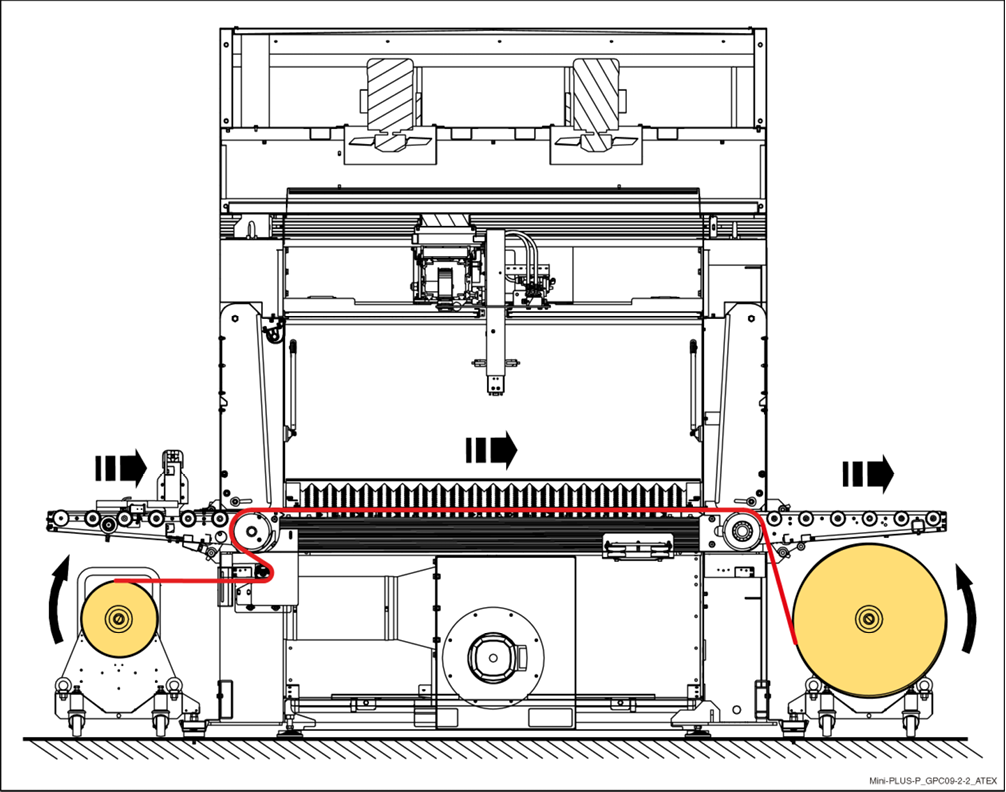
Thread the paper:
Behind the sensor bar location
Behind the first roller
Over the main Conveyor roller
Tape the paper to the conveyor belt.
Reconnect air to the take-up roll.
On the control panel:
Clear alarms
Start Manual Mode
Go to Conveyors and start the conveyor to pull paper through
Once paper is close to the outfeed, Stop Conveyor
Un-tape paper from conveyor.
Thread paper down to the take-up roll, after main conveyor.
Tape to take-up roll/empty core.
Start Conveyor in Manual Mode to wrap the paper onto the take-up roll.
Reinstall the sensor bar (must ride on top of the paper).
Reinstall side shields.
Verification
No active alarms
Paper feeds smoothly, without tears or wrinkles.
Image from manual showing proper routing of paper: